Tampilkan postingan dengan label Cell Phone Tips. Tampilkan semua postingan

8 Simple Tips To Take Better Cell Phone Pictures

How to Improve your Cell Phone Photography with 8 Easy Tips

Here at we share news, reviews and promo codes! Take a look around if you're new!

 How to Improve your Cell Phone Photography with  8 Simple Tips to Take Better Cell Phone Pictures
8 Camera Phone Tips
All cell phones include a camera which is very convenient for snapping photos of friends, family and daily life, but can be annoying when the photos don't turn out very well.

Cell phone cameras are improving, especially for high end smartphones, and more and more people are relying on them to record important events and memories.

But we have all probably experienced trying to capture a moment only to see the image turn out poorly. Well we are sharing our best tips to help you capture better photos with any cell phone camera.

Obviously more expensive smartphones tend to have much better quality cameras which makes taking a good photo easier, so if you really enjoy shooting with your cell phone, we suggest looking into phones like the iPhone SE, Moto G6, iPhone 8, and Samsung Galaxy S9

Camera Phone Photo Tips Outline:

1. Use the 3x3 Camera Grid
2. Clean your Lens!
3. Avoid using Flash (when possible)
4. Look for Good Lighting and Use It
5. Zoom with your Feet
6. Tap to Focus
7. Hold it Steady!
8. Edit your Photos

Budget phones are still capable of capturing good photos and these tips will help you do that!

8 Tips to Improve Your Cell Phone Photography

1. Use the 3x3 Camera Grid
 How to Improve your Cell Phone Photography with  8 Simple Tips to Take Better Cell Phone Pictures
Rule of Thirds - Cell Phone Camera Tips
Just about every camera app should have an option in the settings to display a 3x3 grid over the screen. This is helpful for a number of reasons, particularly photography's 'Rule of Thirds' which says that the intersecting points of the 3x3 grid is where you should put the main subjects in your photo. Additionally the grid is helpful for keeping the horizon level.

See the image on the right and how the grid helps line up the islands in the photo and keep the horizon level.

2. Clean your Lens!
Many a photo has been ruined by a smudged or dirty lens and quick wipe before you go to take a shot can go a long way in avoiding one possible reason your photo didn't turn out as well as you were hoping.  The edge of a t-shirt or other soft cloth is great for this and don't forget to wipe the lens on the front of the phone for selfies.

3. Avoid using Flash (when possible)
Many phones now also have a flash which is helpful for lighting up night scenes. However, flash can also leave parts of the photo overexposed and nasty shadows. Try turning the flash off and shooting with the available light first, and use flash as a last resort. Your photos should look more natural and people in your images will appreciate not getting blinded.

4. Look for Good Lighting and Use It
Photography is all about light but you don't need to be a great photographer to understand light, simply look for ways to have the subject in your photo positioned so they make use of the light available. For example, if you are inside a room with a window, try positioning the subject so that the light from the window falls on their face and naturally brightens it. Try to avoid bright lights behind your subject as they will tend to cause your subject to be too dark.

Taking a moment to reposition your subject before shooting can go a long way towards creating a better image.

If you are taking pictures of a landscape, sunrise and sunset are the preferred times to shoot as the light is the most unique and softer than mid day.

5. Zoom with your Feet
Although cell phone cameras have zoom, don't use it (as much as possible). It is much better to move your feet and get closer rather than using the phone to zoom as the quality of the image will degrade significantly.

6. Tap to Focus
Most cameras allow you to tap/touch to focus on a specific subject in the photo and this is great for shooting any closeups. Additionally, this may help your camera expose more properly for the subject you are shooting.

7. Hold it Steady!
Keeping the camera steady goes a long way to getting a sharp image. Hold the phone with both hands when possible, and even try bringing your elbows in towards your body to add more stability. You can also try setting the phone on a table or railing to help stabilize further.

Another great tip is to set your camera's timer for two seconds to further avoid shaking the camera.

8. Edit your Photos - Lightroom Mobile
Going beyond an Instagram filter and actually editing your photo can make a noticeable difference and sometimes recover details in an over or under exposed image.

There are lots of free and paid apps for photo editing, but we have found the free LightRoom Mobile app is very robust while also fairly simple and gives users significant control over photo editing.

Bonus Tip! Try Third Party Camera Apps
Did you know you can download other camera apps to take over form the standard camera app that came with your phone? This can be really fun and helpful if you are looking for certain features or just want to try something new.

That's it for our cell phone photography tips, we hope these will help you shoot better images! Leave a comment below with any questions or your own tips!

Join us on Facebook with a community of over 3000 members where we share the latest news and reviews and are available to answer your questions.

Looking to upgrade your phone? See the best iPhone SE, Latest Tracfone Smartphone List (2018) for all the new phones available.

Thanks for visiting!
Share:

7 Tips To Make Your Prepaid Minutes Last Longer

Running out of minutes for your prepaid cell phone is no fun, so here are a few tips to help make those minutes last longer and to get the most for your money. Updated by 7/25/2018

How to Manage Your Prepaid Minutes and Make them Last Longer

Running out of minutes for your prepaid cell phone is no fun 7 Tips to Make Your Prepaid Minutes Last Longer
7 Tips for Saving your Airtime
Use these practical tips to help control how fast your minutes escape from your cell phone. 

1. Keep Track of Your Airtime Balance

One of the best ways to make your airtime last longer is to just keep track of how much you are using. When you are checking it regularly you will be able to notice when you use more than expected or if something caused you to run out of minutes.

On non-smartphones it is very easy to see the airtime balance on the home screen but smartphones are a little more challenging to find.

Fortunately we have shared 4 Ways to Check Your Airtime Balance including several additional tips.

One of the easiest is to dial *777*1# which then gives you your current minutes balance. This doesn't work for all smartphones but is a convenient option if it works for you.

2. Always Use a Promo Code

When you add a new minutes card to your prepaid cell phone, always make sure you use a promo code to get free bonus minutes. 

There are promo codes for both regular airtime cards and Smartphone only cards, so be sure to use the right one.

Most promo codes give you 20-50 bonus minutes on regular airtime cards, and anywhere from 100 bonus talk minutes to 500 MB extra data which is a great deal.

Check out our full list of updated Tracfone Promo Codes and find one to use next time you add minutes to your phone.

For some minute cards, like the 400 minute and 1 year of service card, you can get as much as 250 bonus minutes! That is a huge boost to your minutes, so go check out those promo codes!

3. Buy the Smartphone Only Cards if you Don't Have Triple Minutes

Triple Minutes for Life was a feature many Tracfone devices came with for several years and it automatically triples your minutes when adding a new airtime card. Its a great deal and very useful but Tracfone recently Made Changes to Triple Minutes for Life and stopped including it on new phones.

So if you don't have Triple Minutes on your phone, buy the Smartphone Only airtime cards as they don't triple anyway, and are generally a better deal for most users.

For example, the 60 Minute Airtime Card is $20 and without triple minutes you get 60 talk/text/data plus 90 service days. The smartphone only card equivalent for $20 gives users 300 talk, 1000 text and 1000 MB Data plus 30 service days. Note that you do not get as many service days, but significantly more airtime.

4. Don't Answer Calls from Unknown Numbers

While you might be tempted to answer every call you get, this quickly uses up your minutes. 

So check the phone number before you answer, and if it is unfamiliar, it might be better to not answer and wait to see if they leave a voicemail. Just be sure that you have your voicemail set up.

It might just be a lot easier to listen to any message they leave, and then determine if it is worth your time.

If you can avoid two calls from telemarketers or other unknown numbers each week you could end up saving quite a lot of airtime in the long run.

5. Don't Give Your Number Out to Everyone (Except your Friends)

Avoid as much as possible giving your number out online. Try not to post it on any websites, or when you signup for accounts unless it is required. 

The more often you give your number out online, the more likely it is a telemarketer will find it, and try to call you.

Also be careful who you give your number out to. If you are checking out at a store and they ask you for your number, think twice before giving it. Offer your email instead.

We are not suggesting you stop giving your number out to friends and family, that would eliminate the whole reason you got the cell phone! 

Just be mindful of where you share your phone number as you could start getting more phone calls than you really want.

6. Use a Video Calling App to Make Calls to Friends and Family 

Making a call to friends or family? Don't use your prepaid minutes, instead use one of the many calling apps that are available for free.

Skype, FaceTime, Google Hangouts and Facebook Messenger all offer free video calling (or you can turn off the video) to anyone with a connected device.

You will need to make sure you are on a WiFi network otherwise it will use up your data.

7. Save Your Data with these Four Steps

For many of us, the mobile data seems to disappear the most easily. This is because there are a number of ways a smartphone might use mobile data without you knowing, or sometimes inadvertently.  So here are four ways to curb your mobile data use.

1. Track Your Data Use, Set Limits and See Which Apps use the Most
You can monitor your mobile data consumption on your phone and actually set warnings when you go over certain limits which can be very helpful.

It is also possible to see how much data each specific app is using on your phone, allowing you to know which apps are the worst offenders in making your data disappear

See how to view your data usage Here for Android, and Here for iPhone.

2. Turn Off Background Data for Data Draining Apps
Most apps will use background data to check for updates, send location information, or a variety of other things that can slowly deplete your mobile data.

Turning off background data helps keep apps from doing so unless they are connected to WiFi and you can also choose specific apps to turn off/on background data.

3. Use WiFi for Big Downloads and Uploads
This tip saves the most data by far - use a WiFi network when you have large files to upload or download. If you have pictures to upload to Facebook, or want to download music to your phone, use WiFi instead of your data and it will make your data last much longer.

Also avoid streaming videos or music unless you are connected to WiFi as these will quickly use up your data.

4. Turn Off All Data when you Don't Need it
Our simpulan tip is to just turn off all Data usage on your phone during times when you don't need it. You can do this in the settings sajian under Data or Cellular Data.

Be aware that you won't get notifications from apps and you won't be able to send or receive group messages or picture via text.

For more helpful information about mobile data visit our post on How Data Works with Tracfone.

That concludes or tips for making the most of your Tracfone airtime. We hope this information helps you save money! Leave a comment with any thoughts or questions.

For more money saving see our latest Deals, Discounts and Sales on Tracfone Devices.

And keep up with the new phones from Tracfone in our List of the Latest Tracfone Smartphones. Or you may be curious about the 5 Best Tracfone Smartphones in 2018.

Lastly, we just shared 8 Tips for Better Cell Phone Pictures to make the most of capturing memories on your smartphone.

Thanks for visiting!

Share:

How Data Works On Tracfone Smartphones

Guide to Tracfone Data Cards and How to Buy Data for your Smartphone

Welcome to the blog! This post will share specifics on how data works on smartphones with Tracfone. Be sure to also take a look at some of our other posts while you're here.

 Guide to Tracfone Data Cards and How to Buy Data for your Smartphone How Data Works on Tracfone Smartphones
How to Buy Data from Tracfone
Note - We created a full breakdown and comparison of Tracfone airtime in this post: New Prices/Changes to Tracfone Smartphone Cards.

Tracfone is a prepaid cell phone service provider that offers both phones and airtime cards. On their newer smartphone devices, you also get data when adding an airtime card which you can use to surf the web when not connected to WiFi.

Data is very useful on smartphones, but how does the data work on Tracfone smartphones, how can you get more, and what can you do with the data you have?

We are going to cover these questions and more in this post sharing all the details about how Tracfone Data works on smartphones.

Some of the popular smartphones that Tracfone offers include the LG Premier Pro, Samsung Galaxy J7 Sky Pro and LG Rebel 3. You can see all the newest devices in our List of the Latest Smartphones from Tracfone (2018).

Or you might be interested in the Tracfone BYOP program, which allows users to bring their own smartphone. Follow the link to learn more, and see a list of the possibilities.

Both the smartphones offered by Tracfone, and the BYOP devices, use data in the same way. So let's get started looking at how data works on these phones.

What is Data on Tracfone Smartphones?

Data is the term generally used to describe the amount (usually in megabytes) you can download or upload on your smartphone via the cell phone network. So data is basically information you download or upload from the internet. This can include many different activities, like checking email, posting photos on Facebook, reading webpages, or watching videos.

Data is consumed based on the amount of megabytes you download or upload. So if you download a 20 MB image, that will use 20 MB of your data. If you visit a webpage that takes 1 MB to load, you will use 1 MB of data. (further down we will share more on estimating how much different online activities will use up your data.)

On older, non-smartphone devices, data was used at a rate determined by the amount of time you were on a website, but this is not the case for smartphones which is a nice improvement.

As you can see, data works similarly to your calling minutes, in that you are charged based on how much you use. But calling minutes are based on time, rather than megabytes. (For example, if you make a 20 minute call, you will be deducted (about) 20 minutes of talk time.)

On Tracfone Smartphones and BYOP devices, airtime is split into three pools, Talk, Text and Data. Learn more about How Airtime Works with Tracfone Smartphones in our recent post.

How Can you Buy More Data for your Tracfone Device?

There are two ways to get more data for your smartphone:

Airtime Cards - You can add both Regular Airtime Cards or Smartphone Only Cards and get a certain amount of data along with talk, text and service days.
Data Only Card - You get only Data, at 1 GB for $10

For most situations you will probably want to add an Airtime card to your phone to increase all your 'buckets' of talk/text/data.

But sometimes you may only want to add data, in which case the data only cards are useful. Let's take a closer look at Data cards to better understand how to use them.

What Are Data Only Cards?

As mentioned above, the Data only card increase the amount of data for your smartphone, without adding any additional texts or talk minutes.

This is similar to the Text only cards we recently discussed.

There are some important things to be aware of the make the Data only cards unique.

First, they can only be used with smartphones, including the Android devices offered by Tracfone, and all phones offered through the BYOP program.

Second, like the Text only card, Data only cards do not triple, so you get the amount listed on the card (1 GB).

Data Card Amount and Cost Per MB Compared to Airtime Cards

Tracfone just offers one Data only card option at this time:
  • 1 GB for $10
This results in 1 cent per MB of data.

Cost per MB for Tracfone Data cards and Airtime cards Compared:

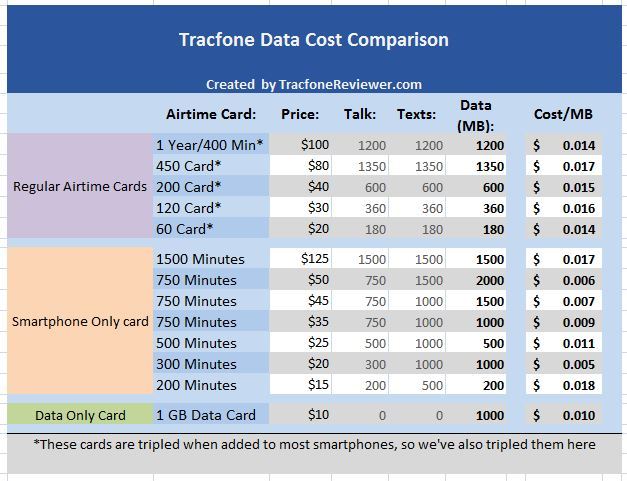
Below is a table with all of the current airtime cards from Tracfone and how much data comes with each one. We've included both Smartphone only cards and regular airtime cards.
 Guide to Tracfone Data Cards and How to Buy Data for your Smartphone How Data Works on Tracfone Smartphones
Tracfone Data Amounts and Cost per MB
There are two key points to take note of from this Chart:
  • Smartphone only cards come with a lot more data compared to regular airtime cards
  • Smartphone only cards are a better deal for data (except the 1500 and 200 minute cards)

In general, if you only need data, the data only card is a good deal. But if you also need talk and texts, then the 300 or 750 minute smartphone cards are a good deal.

Where to Buy Tracfone Data Cards

Tracfone Data cards are available form a variety of sources, as is the case for Tracfone Airtime cards. You can find Data cards on the Tracfone website under Airtime.

You can also find the Tracfone Data cards in many retail stores, and even online through other retailers. We have found Data cards on eBay in various amounts.

Now let's cover one more question that we see asked quite often.

How Much Can you Do Online with 300 MB of Data?

A common question we see is, what can you do online with a certain amount of data? This is a very good question, because many people tend to estimate how many airtime minutes they will need, and then buy the airtime card that suits their needs best. But if you're unfamiliar with how much data is used by smartphones, it makes it hard to estimate.

It is a little hard to give a straight answer to this question, it all depends on what you do online  Take a look at this image (provided by Tracfone) to help give you a better idea:

 Guide to Tracfone Data Cards and How to Buy Data for your Smartphone How Data Works on Tracfone Smartphones
Estimated usage for 300 MB of data with Tracfone
From this table we see you can visit about 245 webpages with 300 MB of data, or send/receive about 4000 emails. Hopefully this information will help you gain a better understanding of how data is used with Tracfone, and where your data is going.

If you notice, doing certain things online, like streaming music, or even more so, streaming video, will use your data quickly, while visiting webpages or sending emails, especially those with few images, will use less of your data.

Another good resource for estimating your data usage is the Data Calculator on Verizon's website. Enter your estimated activities, and it will tell you about how much data you will use in a month.

Remember, that if you want to stop using data, you can go into the settings on your device, select data, and turn it off. Using WiFi networks, like at your home or work, does not deduct from your data.

Tips for Reducing Data Use
Here are some helpful tips to reduce the amount of data you use.
  • Keep track of your data use and set data use warnings to help
  • Turn off background data (learn more here)
  • Download/upload large files over WiFi as much as possible
  • If you use Google Maps often in a certain area, download the map of that area over WiFi. Here is some helpful information about using Google Maps without using data.
  • Download songs/podcasts over WiFi instead of streaming them.
  • Set your Apps to only update over WiFi.
  • Download Images/Videos only when using WiFi
As you can see, the best way to reduce data usage is to avoid using it for large downloads or uploads, which will quickly drain your data. Using free WiFi whenever possible will go a long way in extending your data.

Here is a helpful article on what online activities use data, and some other basic details about data usage from an AT&T Forum.

We hope you found this information helpful, and please leave a comment with any questions, or if you have something to add!

Learn the basics of how Tracfone works with our Beginners Guide to Tracfone.

Find us on Facebook and join over 2000 followers who get the latest news and updates.

Take a look at one of our other popular posts, the Over 30 Great Android Apps to use with your Smartphone.

And check our recent post on 7 Ways to Reduce Your Airtime Usage with Tracfone including some more tips for making your data last longer.

Thanks for visiting!

Originally published 8/2015 and Updated 8/2018
Share:

6 Best Tracfone Cell Phones 2018

Top 6 Tracfone Prepaid Cell Phones for 2018

(Updated on 11/2018)

Everyone wants to know, what is the best Tracfone device? Which cell phones are the best options from Tracfone? We have collected the information and now share the top 6 options from Tracfone below.

As you might expect, this list is dominated by smartphones Tracfone has released over the last year or two. But which one will receive the top pick? And where in the ranking do the rest of the phones fall?

 Which cell phones are the best options from Tracfone 6 Best Tracfone Cell Phones 2018
Best Tracfone Cell Phones in 2018

If you would like to see all of our recent reviews, visit our Latest Tracfone Cell Phone List.

We are judging this list of the best cell phones based primarily on features, specifications, and performance as well as feedback from consumers. Price and availability will only be small factors, as both of these variables change often.

We will provide a short description of each phone in the list, and a link to our full review if available. This list is written as a helpful guide, that can give you an idea of which phones are generally better than others. However, each phone has certain features which are more important to some people, thus making that phone the best choice, even if it isn't at the top of our list.

For most users, the top phones in our list are impractical due to their high cost. So a good option is to purchase an unlocked phone and use with the the Moto G6 (and now also in our list) is a newly released smartphone that might be a great option as it blends a number of premium features at a more reasonable price.

Now let's see the list!

6 Best Cell Phones from Tracfone (2018)

The best phones available from Tracfone as of November 2018:

#1 Apple iPhone 7

The iPhone 7 is our pick for the best phone from Tracfone at this time. It brings updates and upgrades to older iPhone models including the A10 fusion quad core processing chip which results in around 2x better performance compared to the iPhone 6.

You also get a 12 MP camera with 4K video recording, 2 GB RAM, 32 GB storage, iOS 10 and a 4.7" retina display.

The iPhone 7 edges out the competition with Apple's well known performance and high quality screen, camera and app store.

The price may be the only drawback, at $599 currently on the Tracfone website. Note that there are newer models of the iPhone available, including the iPhone 8 and iPhone X but they are not available from Tracfone at this time.

Choosing between Apple and Android is usually a matter of personal preference, as the operating systems differ quote a lot, and many users prefer to stick with one or the other.

#2 Samsung Galaxy S7

The second best phone from Tracfone is the Samsung Galaxy S7. It beats almost all of the competition with incredible features and performance.

The S7 features a 5.1" quad HD screen, Android 6.0, 32 GB internal memory, octa-core processor and 12 MP camera with dual pixel technology.

The Galaxy S7 brings a handful of improvements and updates from the S6. It isn't the most recent Galaxy model, but the price has also been reduced accordingly, at $380 on the Tracfone website.

As with several of the other options in this list, finding an unlocked S7 and using it on Tracfone BYOP is a cheaper option.

#3 Apple iPhone 6S Plus

In third place in this list is the iPhone 6 Plus which is larger and more powerful compared to the iPhone 6, but also has a higher price. The iPhone SE has the same camera, but a much smaller screen.

The 6S Plus comes with Apple iOS, a 5.5" HD touchscreen, 32 GB internal memory, dual core processor, 2 GB RAM and 12 MP camera.

While the specs are not impressive on paper, Apple devices are well known for their great performance due to their unique operating system and tailored processors. The 12 MP rear camera has excellent image quality and can record 4K footage at 30 FPS for high resolution videos.

The iPhone 6S Plus is currently listed on the Tracfone website for $399 which is a pretty good deal. There are also unlocked refurbished options available on Amazon for $280 (GSM compatible)

#4 Moto G6

Newly available from Tracfone at the end of 2018, the Moto G6 is a very popular budget smartphone that packs a number of great features into a reasonable price, and now it is available from Tracfone!

With a 5.7" full HD touchscreen, Android 8.0 Oreo, 32 GB Storage, 3 GB RAM and Dual Rear Cameras, the G6 has a lot to like about it.

The Moto G6 is one of only a few smartphones from Tracfone that offer 32 GB storage, and certainly the least expensive at this time. For more details on this device, see the Full Tracfone Moto G6 Review.

There are several online retailers offering the Moto G6, including Tracfone and HSN, with the HSN deal including an airtime bundle for $199.

The Moto G6 is a great value for the money and it can also be found unlocked and used with either GSM or CDMA service on Tracfone BYOP.

#5 Samsung Galaxy S6

The Samsung Galaxy S6 comes in at number five on our list of the best Tracfone cell phones with a great list of features and specs that sets it apart from budget smartphone options.

It has a 5.1" quad HD touchscreen, octa core processor, 32 GB internal memory and 3 GB RAM. You also get a 16 MP camera with excellent video and photo capabilities.

Perhaps the only drawback (besides the price) for the Galaxy S6 is that it only has Android 5.0, a somewhat older version of the operating system, and it is not possible to upgrade it.

See more of the features in our Samsung Galaxy S6 Review which also includes how much you will have to pay to get one.

For those seriously interested in the Galaxy S6, you may want to consider Guide to Activating with Tracfone BYOP to make it as easy as possible.

In general, we would suggest users consider some of the newer phone options further down this list.

#6 iPhone SE 32GB

Even though the iPhone SE has a small, 4" screen, it packs some powerful features and specs into the small phone body including an excellent 12 MP camera, 32 GB storage and a fingerprint reader.

The iPhone SE actually has the same internal specs as the larger, iPhone 6S, and they were both released at the same time. The iPhone SE originally retailed for $399, but the Tracfone website has it available for around $200.

Many people like the iPhone SE for the sleek design and smooth operating system and great camera. Just be aware that the screen is much smaller than most phones these days, and newer options are available (further down our list...)

The iPhone SE can be found on the Tracfone website and in some retail stores. Additionally, you can buy your own iPhone and bring it to the Tracfone BYOP program. Follow the link to learn more.

That concludes our list of the Best Tracfone Cell Phones. For many, buying the S6, iPhone 6 Plus or S7 would be impractical because of the high cost, but these are the best options available through Tracfone. Leave a comment with your thoughts, and if you enjoyed this list, take a look at our List of the Best Phones for Tracfone BYOP.


Honorable Mentions - Unlocked Smartphones on Tracfone BYOP

The BYOP kegiatan from Tracfone makes it easy for consumers to have the phone they want at a reasonable price on Tracfone's prepaid service. Visit our main, Tracfone BYOP page for all the details.

The Moto G6 is an example of a popular unlocked smartphone that can be used with either GSM or CDMA service and is available for around $220.

We hope you found this article useful, leave a comment with your pick for the best Tracfone device. Also be sure to share this with your friends.

----------

We also want to share that Tracfone continues to add new phones to their lineup, and we will work to update this post as needed.

For more on the cell phones offered by Tracfone, visit our Cell Phones Review page.

Also don't forget about our most popular page, the Tracfone Promo Codes!

Finally, keep up with all the latest news and isu on our Facebook page!

Thanks for visiting! Which cell phones are the best options from Tracfone 6 Best Tracfone Cell Phones 2018 Which cell phones are the best options from Tracfone 6 Best Tracfone Cell Phones 2018 Which cell phones are the best options from Tracfone 6 Best Tracfone Cell Phones 2018
Share:

How Do Minutes Work On Tracfone Smartphones?

A Short Guide to Adding Minutes to Tracfone Android Smartphones

Updated on 12/17/18. is committed to sharing the best and most accurate information for our readers.

 A Short Guide to Adding Minutes to Tracfone Android Smartphones How Do Minutes Work on Tracfone Smartphones?
How Minutes Work with Tracfone Smartphones
Over the several years, Tracfone has included a number of Android and Apple powered smartphones in their lineup of cell phones.

Tracfone provides both cell service and phones at a low cost and sells airtime cards with varying minute amounts (60, 120, 200 etc.) that users can buy and add to their phone. When the minutes are added, the phone then uses those minutes when you call or text. You also get a certain amount of service days (in most cases 90) with each card.

This system where users can buy minutes only when needed helps to make Tracfone service very inexpensive for people who don't use their phones very often.

Some Tracfone devices also come with double or triple minutes for life, meaning you get double (or triple) the minutes when you add a new card. However, Tracfone has made Changes to Triple Minutes for Life and you can learn more by following the link.

One of the changes to triple minutes is that most new smartphones from Tracfone do not come with this bonus. However, Tracfone now offers a number of smartphone only airtime cards that come with a significantly greater amount of airtime compared to regular airtime cards.

Let's start by looking at smartphone only cards.

How Smartphone Only Cards are Different than Regular Airtime Cards

Tracfone offers two types of airtime cards - 'regular' cards and 'smartphone only' cards.

Regular Airtime Card - Airtime values of 60, 120, 200 etc. and most cards come with 90 days of service. Can be added to any Tracfone device and can triple.

Smartphone Only Card - Each card comes with a specific amount of Talk/Text/Data such as 500 talk minutes, 1000 texts and 500 MB data on the $25 smartphone card. These cards can only be added to smartphones and can not triple.

So the main differences between these cards is that smartphone cards come with more airtime, do not triple, and can only be used with smartphones.

When adding a smartphone only card you will get exactly the amounts listed on the card (unless you also use a promo code!).

Learn more about smartphone cards vs regular cards with our Guide to the Best Deal on Tracfone Minutes.

Now that we've covered smartphone only cards, we will look at some important differences for how regular airtime cards work with smartphones.

How Tracfone Minutes are Added to Android Smartphones

With Smartphones (which includes both those from Tracfone, and BYOP devices), the way minutes from regular airtime cards are credited to your account is a bit different than how things worked for older 'dumb' phones.

For older phones like the LG 840G, when you added a 60 minute card, you would get it tripled to 180 minutes which you could then use for talk, text and surfing the web.

For smartphones, Talk, Text and Data are split up when you add the minutes. So if you add a 60 minute card, you will get it tripled (in most cases) to 180 minutes, and then this is split up into 180 minutes for talking, 180 texts, and 180 MB for web.

So to make it clear:
  • Non-Android phones use one 'pool' for minutes.
  • Android phones use three separate 'pools' for talk, text and data.
Once the airtime is split into these different pools, you can't transfer it from one 'pool' to another.

For most people an Android phone is a great deal because you get the same number of minutes for talking, while also receiving texts and data. But there is an important difference that makes this not a great deal for everyone.

Related post - 6 Key Differences between Android and non-Android Tracfone Devices

The difference is that for people who text a lot, Android phones are not as great a deal if you ONLY buy the regular airtime card. Let me explain:

For a non-Android device, each text costs 0.3 minutes. So with 180 minutes, you would get 600 texts.

On an Android phone, each text is 1 text (because texts are their own 'pool'). So with 180 minutes, you would get 180 texts (you would also still have 180 minutes for talking, and 180 MB of data).

But there is a solution. Tracfone now offers text refill cards ($5 for 1000 texts), and they also offer Smartphone-Only airtime cards that are a much better deal for most people. We've done a Comparison of Smartphone Airtime Cards vs. Regular Airtime Cards and found some very interesting results, so take a look if you want to find what card is the best deal.

The text refill card is an easy way to reload your phone if you get low on texts. And at only $5 for 1000 texts, that's just half a penny per text, so a very good deal. Read our guide on How to Add Texts to your Tracfone Device for further details.

If you are a heavy texter but want an Android phone, look into downloading apps that text for free. Simply visit the Google Play Store and search for 'free texting apps'.

See all the newest devices from Tracfone with our Latest List of Tracfone Smartphones.

For those who don't want to switch to this new minutes system, phones like the LG 840G we mentioned above, the LG 306G, Moto EX431G, and Samsung S425G still use the one pool system for minutes (and all of these phones have Triple Minutes).

If you have further questions on how minutes work, feel free to leave a comment below. Now, we want to go over one more important point:

How Triple Minutes for Life Works on Smartphones from Tracfone (And BYOP)

We've noticed a number of readers who have questions about how Triple Minutes for Life works with the smartphones, and especially the new smartphone airtime cards.

There have been some recent changes to Triple Minutes for Life from Tracfone, and we've outlined them in our post, Tracfone Changes Triple Minutes for Life.

Tracfone Smartphones released after April 2017 may not include Triple Minutes for Life, where as older smartphones will still have triple minutes.

Newer SIM card kits also do not include Triple Minutes for Life for BYOP phones.

This is disappointing to many, but the Smartphone only airtime cards did not triple anyway, and are generally a better deal for most users.

How to Check Your Minutes Balance on Android Phones

 A Short Guide to Adding Minutes to Tracfone Android Smartphones How Do Minutes Work on Tracfone Smartphones?
Tracfone airtime for Androids
This is a question many are asking, because there is no automatic location on Tracfone smartphones for accessing your current minutes balance like there is on non-Android phones.

We've created a full guide with 4 ways to Check your Airtime on a Tracfone Smartphone or you can continue reading below.

But there is an easy way to check your balance. Simply sign into your account at Tracfone.com (or create one of you don't already have one) and go to your account page. You should see your phone listed there, and one of the options will be to check your current balance. Click this and after a few seconds you should see what your remaining balance looks like.

You can do this either on a computer, or from your phone. Additionally, there are two more options for checking your balance:

Enter the following url into your browser from your phone or computer and replace the numbers at the end with your phone number: https://www.tracfone.com/direct/CheckBalance?input_phone=1234567890

Or simply download the Tracfone App which allows you to see your service end date and balance.

That concludes this guide to how minutes work on Android phones. We hope you found this useful, and leave a comment with questions or thoughts.

Find us on Facebook with a growing community of helpful people.

Be aware that Tracfone Promo Codes don't work on Android phones, so this is also a small downside of the new smartphones.

Check out the latest and greatest sales, deals and discounts on Tracfone devices and minutes for some huge savings we've found around the internet!

Thanks for visiting!  A Short Guide to Adding Minutes to Tracfone Android Smartphones How Do Minutes Work on Tracfone Smartphones?
Share:

Categories

Ordered List

  1. Lorem ipsum dolor sit amet, consectetuer adipiscing elit.
  2. Aliquam tincidunt mauris eu risus.
  3. Vestibulum auctor dapibus neque.

Sample Text

Lorem ipsum dolor sit amet, consectetur adipisicing elit, sed do eiusmod tempor incididunt ut labore et dolore magna aliqua. Ut enim ad minim veniam, quis nostrud exercitation test link ullamco laboris nisi ut aliquip ex ea commodo consequat.

Definition List

Definition list
Consectetur adipisicing elit, sed do eiusmod tempor incididunt ut labore et dolore magna aliqua.
Lorem ipsum dolor sit amet
Consectetur adipisicing elit, sed do eiusmod tempor incididunt ut labore et dolore magna aliqua.

Support

Need our help to upload or customize this blogger template? Contact me with details about the theme customization you need.